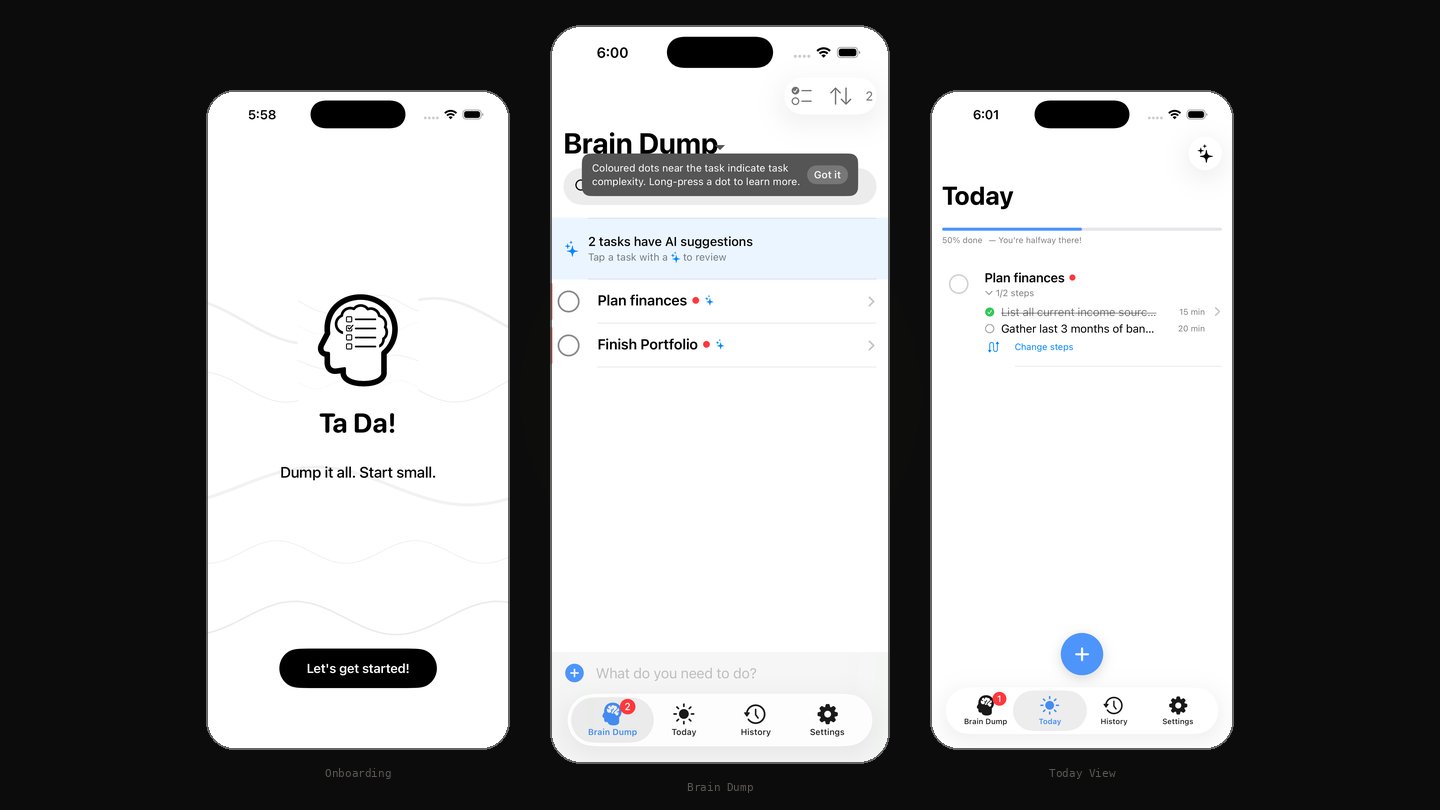
Ta Da! app: Brain Dump and Today views
Ambiguity, not effort, drives avoidance.
An iOS app for the tasks you've been avoiding. The app detects which tasks cause you to freeze and breaks them into concrete first steps.
Todoist, Things, TickTick, Apple Reminders. They all give "Buy milk" and "prepare investor deck" the same text field, the same checkbox. But these aren't the same problem. One takes thirty seconds. The other requires you to figure out what "prepare" even means before you can do anything. Avoidance comes from the second kind, and avoidance is an ambiguity problem, not a motivation problem.
When a task is framed as an outcome ("figure out health insurance") and you can't identify the first physical action, you take none. The friction isn't doing the thing. It's identifying where to start.
Todoist's Task Assist comes closest with AI subtask suggestions, but it's reactive, complexity-blind, and paywalled. No mainstream app detects cognitive overload at the point of action. That's the gap Ta Da! is built for.
I started building for myself. But "me" isn't a persona. The screener is what turned a personal pattern into a product thesis, and 5 behaviourally-screened testers are lined up to pressure-test it next.
I designed a behavioural screener with a scoring rubric. Each respondent scored 0-7 against criteria, not self-reported opinions. 35 responses.
Behind the headline numbers, 64% of respondents in this survey exhibited the full pattern: burst dumping, accumulated backlog, avoidance behaviour. Within this sample, the "overwhelmed dumper" isn't a niche persona, it's the dominant behaviour pattern.
Should this task be broken down to make it easier to tackle? You type a task and hit return. The AI silently scores it across three dimensions: action clarity, step count, and cognitive load. Simple tasks stay as-is. Complex ones get broken into a concrete first step you can act on immediately.
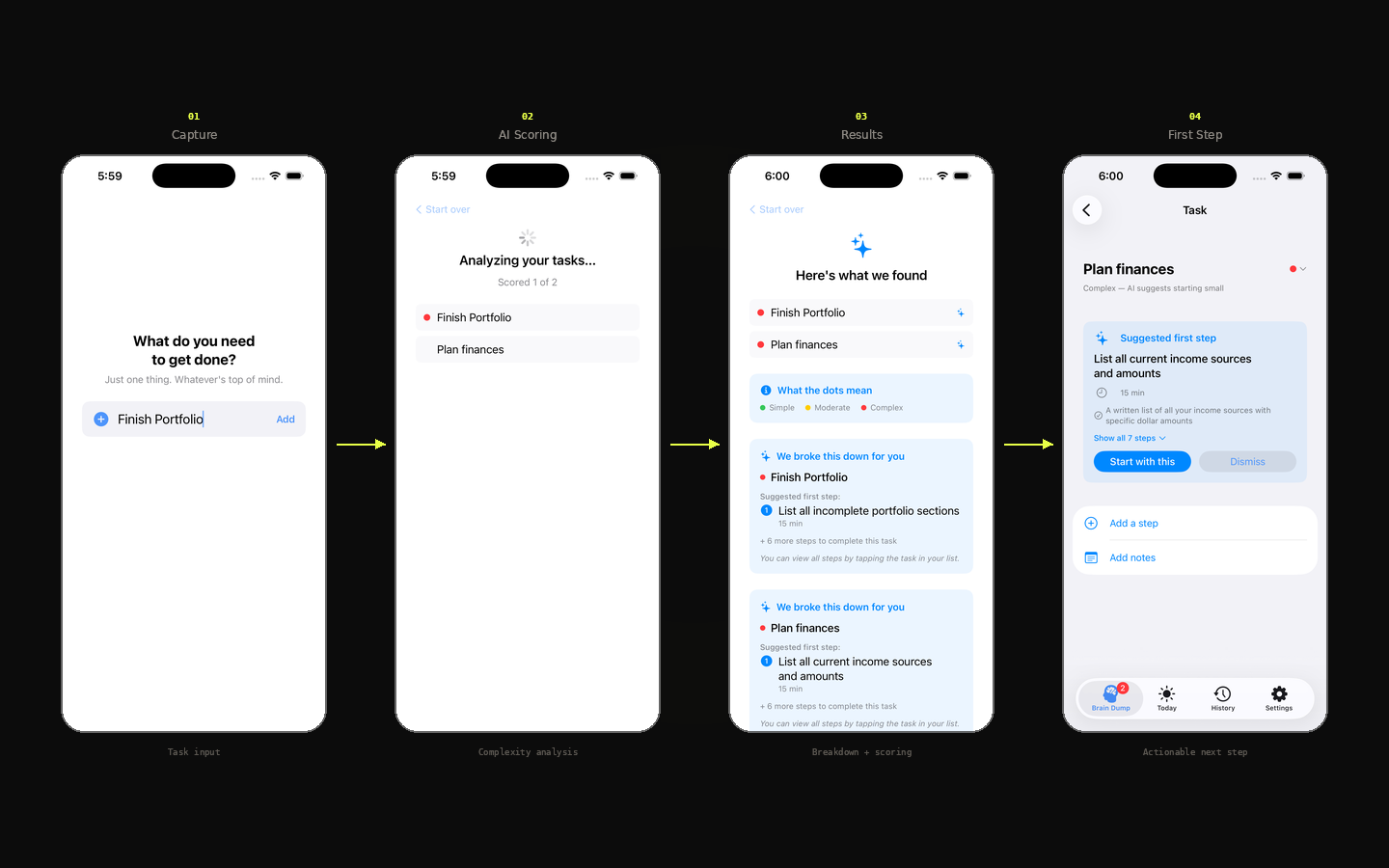
Built to lose your attention the moment you know where to start. Re-engagement is earned, not engineered: users come back when the next avoided task needs unblocking.
You experience the AI before entering the app. The value prop isn't explained, it's felt.
Frustrates power users. Necessary anyway. The target user's problem is having too much to do, not too little.
The first step is computed the instant a complex task lands. The obvious move is to show it immediately. It doesn't. On the list, a complex task gets a sparkle and a prompt to tap in, nothing louder. And when the breakdown is accepted, the app asks first rather than rewriting the list on its own. A list that announced and auto-changed every task would re-create the overwhelm the app exists to remove. Calm over spectacle, and the first thing to test with real users.
North star: complex tasks completed per active user per week. Not tasks captured. Not streaks. The metric that proves the product works.
Other task apps optimise for attachment. Capture rates. Streaks. Daily logins. Ta Da optimises for whether the avoided task actually got finished.
Two layers of success. Within a session, the win is leaving the app fast. Across sessions, the win is coming back tomorrow because another avoided task needs unblocking. One is design discipline. The other is sustained utility. Both reinforce.
| Signal | Threshold | Action |
|---|---|---|
| Acceptance rate | Below 70% | Review the scoring prompt |
| Helpfulness | Mostly 1s | Tune decomposition quality |
| Override rate | Above 10% | Recalibrate thresholds |
The system is built and instrumented. No real usage data yet. Tester feedback is the next phase.
10 days, end to end. A master context doc anchored every session. Five custom skills scoped the work: UX writing, AI UX patterns, onboarding activation, iOS HIG, and UX Laws. An instrumented analytics framework (30 events, CSV export) anchored measurement. Dogfooded daily.
I built first, validated after. The screener confirmed direction. If the data hadn't, I'd have shipped around the wrong problem. Next time: validate first.
18 issues surfaced after the build. 10 required code changes. Architecture decisions are cheaper on paper.
A real app to dogfood, not wireframes. And writing the spec after the fact, then auditing the build against it, surfaced where shipped reality drifted from intent, the kind of gap that stays invisible when you never write the spec down.
Three open problems: AI still struggles with genuinely ambiguous tasks, API-key dependency doesn't scale, the model has no persistent memory of user inputs. The real "what's next" is whatever five people who aren't me tell me is broken.